**Category:** VoIP
**Difficulty:** Beginner → Intermediate
## What You'll Learn
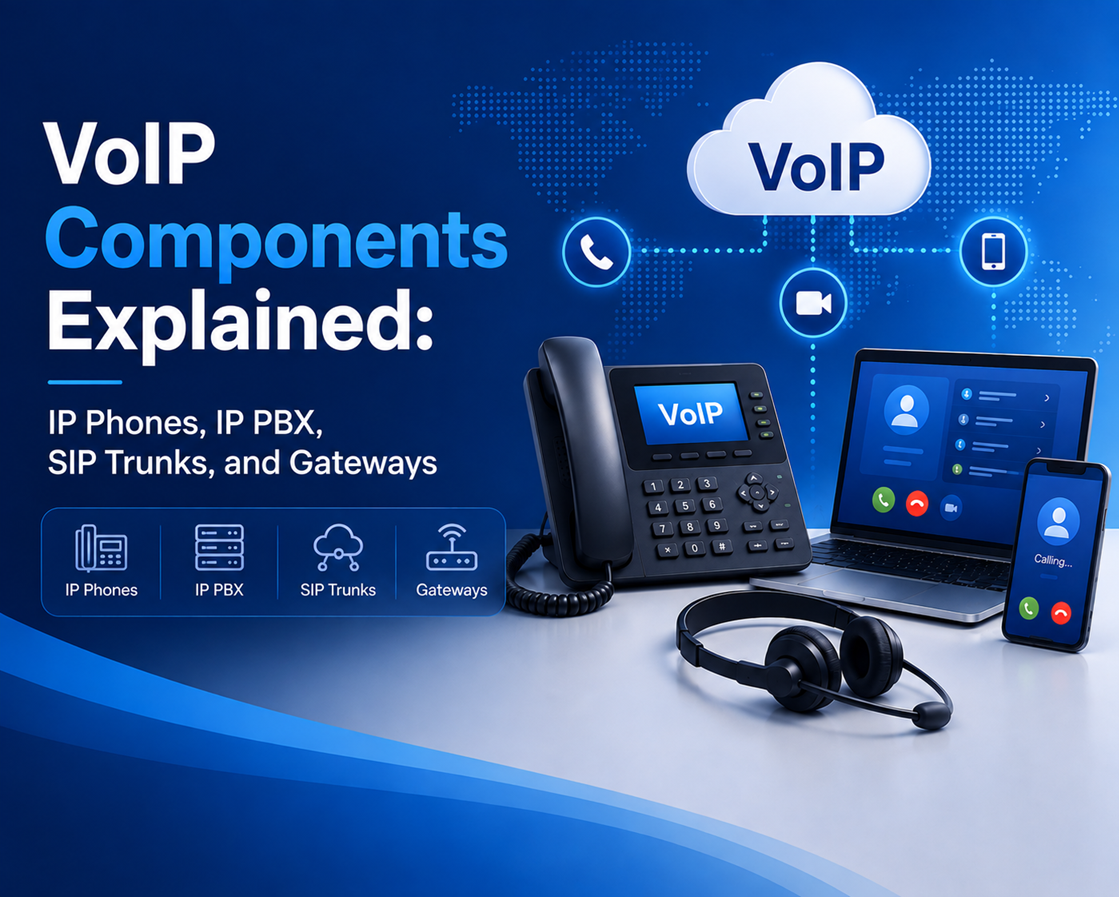
A VoIP system consists of several components working together to deliver reliable voice communication over IP networks. While making a phone call may appear simple, multiple devices and services are involved behind the scenes—from the IP phone that captures your voice to the IP PBX that routes the call, the SIP trunk that connects to the public telephone network, and the gateway that bridges legacy systems.
Understanding the role of each component is essential before deploying, managing, or troubleshooting a VoIP environment.
In this article, you'll learn the purpose of each core VoIP component, how they interact, and how they form a complete enterprise VoIP architecture.
## Learning Objectives
After reading this article, you will be able to:
- Identify the core components of a VoIP system.
- Explain the role of an IP Phone, IP PBX, SIP Trunk, and VoIP Gateway.
- Understand how VoIP devices communicate with each other.
- Differentiate between SIP trunks and VoIP gateways.
- Understand a typical enterprise VoIP architecture.
## In This Article
- Overview of a VoIP system
- What is an IP Phone?
- What is an IP PBX?
- What is a SIP Trunk?
- What is a VoIP Gateway?
- How the components work together
- Typical enterprise VoIP architecture
- Frequently Asked Questions
---
## Understanding a VoIP System
Think of a VoIP system as a complete communication ecosystem. Each component has a specific responsibility, and together they enable users to make and receive voice calls efficiently.
The four core components are:
| **Component** | **Primary Function** |
| --- | --- |
| IP Phone | Captures and plays voice |
| IP PBX | Controls call routing and features |
| SIP Trunk | Connects to the VoIP service provider |
| VoIP Gateway | Connects IP networks with traditional telephone systems |
Depending on the organization's requirements, additional components such as Session Border Controllers (SBCs), firewalls, voicemail servers, and management systems may also be included.
---
## What Is an IP Phone?
An **IP Phone** (also called a SIP Phone) is a telephone specifically designed for Internet Protocol (IP) networks. Unlike traditional analog telephones that connect to telephone lines, an IP phone connects directly to an Ethernet or Wi-Fi network.
Its primary function is to convert voice into digital packets for transmission and convert incoming packets back into audio for the user.
### Key Features
Most modern IP phones include:
- High-definition (HD) audio
- Multiple SIP account support
- Power over Ethernet (PoE)
- LCD or touchscreen display
- Programmable function keys
- Conference calling
- Headset support
- Gigabit Ethernet ports
Many enterprise IP phones also support Bluetooth, Wi-Fi, USB accessories, and video conferencing.
### How an IP Phone Works
When a user speaks into the handset or headset:
- The microphone captures the analog voice.
- The phone digitizes the audio.
- A codec compresses the voice.
- SIP establishes the call.
- RTP transports the audio packets.
- The receiving phone reconstructs the audio.
This entire process occurs in real time, typically within a few milliseconds.
---
## What Is an IP PBX?
An **IP PBX (Private Branch Exchange)** is the central controller of a VoIP system. It manages user extensions, processes call requests, and provides advanced telephony features.
Think of the IP PBX as the "brain" of the VoIP system.
Without an IP PBX, individual IP phones would have no centralized mechanism for locating users, routing calls, or providing enterprise features.
### Responsibilities of an IP PBX
An IP PBX typically performs the following tasks:
- Registers SIP devices
- Authenticates users
- Routes incoming and outgoing calls
- Manages extension numbers
- Provides voicemail
- Supports Interactive Voice Response (IVR)
- Creates ring groups and call queues
- Handles call forwarding and transfers
- Records calls (where configured)
- Generates Call Detail Records (CDRs)
### Popular IP PBX Platforms
Some of the most widely used IP PBX solutions include:
- Asterisk
- FreePBX
- PortaSwitch
- FusionPBX
- 3CX
- Cisco Unified Communications Manager (CUCM)
Each platform offers different capabilities depending on business requirements.
---
## What Is a SIP Trunk?
A **SIP Trunk** is a virtual telephone connection that links an organization's IP PBX to a VoIP service provider or telecommunications carrier.
Instead of using physical telephone lines, SIP trunks carry voice traffic over IP networks.
This allows businesses to make and receive calls to external telephone numbers without maintaining traditional PSTN circuits.
### Benefits of SIP Trunking
Organizations adopt SIP trunking because it offers:
- Lower communication costs
- Easy scalability
- Geographic flexibility
- Number portability
- Simplified infrastructure
- Support for multiple concurrent calls
A business can often increase call capacity by updating its service plan rather than installing additional physical lines.
### SIP Trunk Call Flow
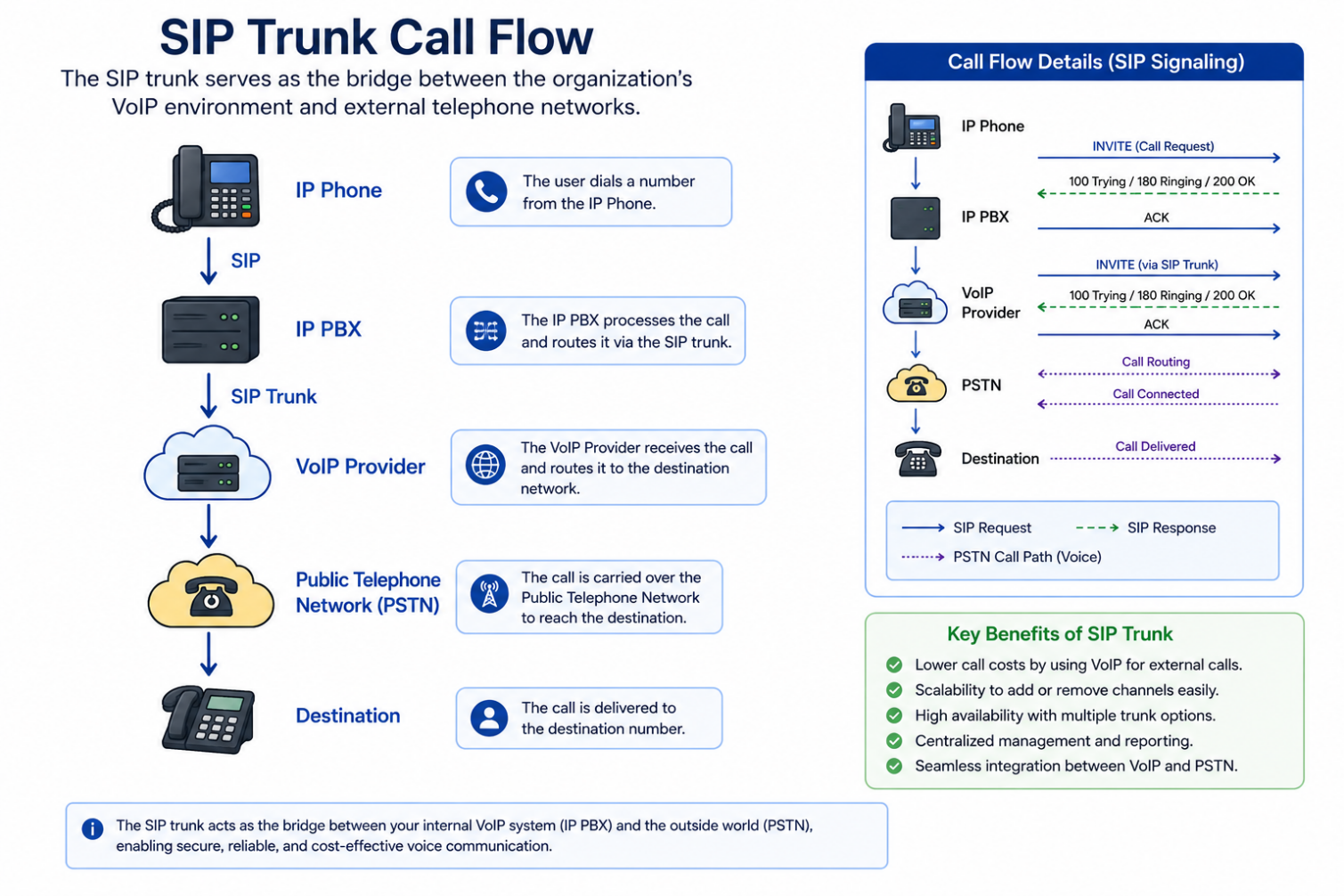
The SIP trunk serves as the bridge between the organization's VoIP environment and external telephone networks.
---
## What Is a VoIP Gateway?
A **VoIP Gateway** connects IP-based communication systems with traditional analog or digital telephone networks.
Organizations commonly use gateways during migration projects when both legacy and VoIP systems must operate simultaneously.
### Why Are Gateways Needed?
Many organizations still use legacy equipment such as:
- Analog telephones
- Fax machines
- PSTN lines
- ISDN PRI circuits
- Analog PBXs
Since these devices cannot communicate directly with IP networks, a gateway performs protocol and media conversion between the two environments.
### Types of VoIP Gateways
**1.FXS Gateway**
Provides analog telephone ports.
Commonly used to connect:
- Analog telephones
- Fax machines
- Paging systems
**2.FXO Gateway**
Connects analog PSTN lines to a VoIP system.
Useful when organizations want to continue using existing telephone lines.
**3.Digital Gateway**
Supports digital interfaces such as:
- ISDN PRI
- E1
- T1
Often deployed in larger enterprise environments.
---
## SIP Trunk vs VoIP Gateway
These two components are often confused because both connect to external networks. However, they serve different purposes.
| **Feature** | **SIP Trunk** | **VoIP Gateway** |
| --- | --- | --- |
| Physical Hardware | No | Yes |
| Connects to PSTN | Through provider | Directly |
| Uses Analog Lines | No | Yes |
| Uses Digital PRI | No | Yes |
| Requires Internet | Yes | Usually |
| Typical Deployment | Modern VoIP | Hybrid environments |
Organizations using modern cloud-based VoIP services often require SIP trunks but may not need gateways unless they still rely on legacy telephony equipment.
---
## How the Components Work Together
The following sequence illustrates how the major VoIP components interact during an outbound call.
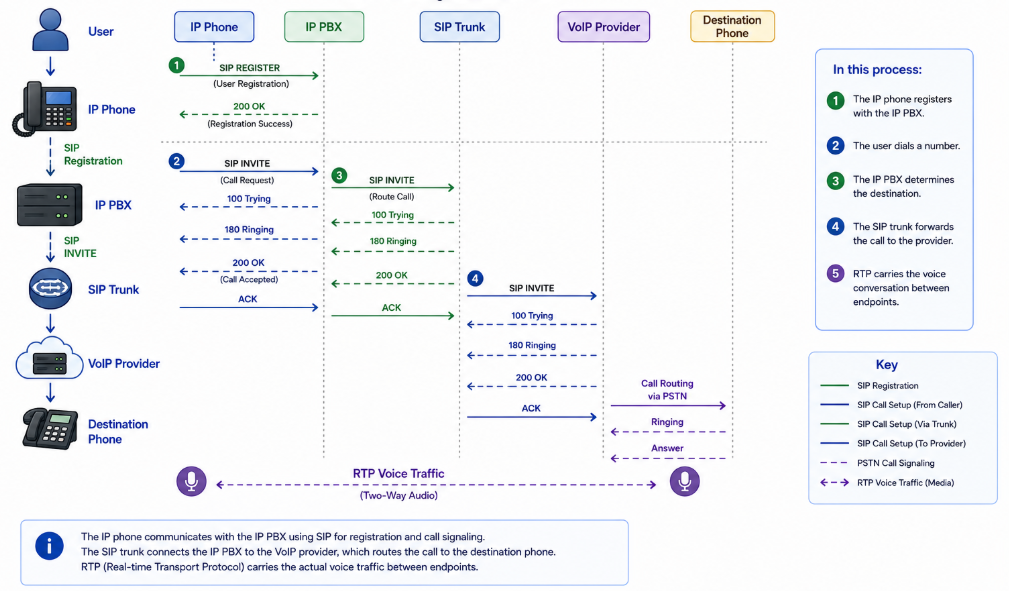
In this process:
- The IP phone registers with the IP PBX.
- The user dials a number.
- The IP PBX determines the destination.
- The SIP trunk forwards the call to the provider.
- RTP carries the voice conversation between endpoints.
---
## Typical Enterprise VoIP Architecture
A modern enterprise VoIP deployment may look like the following.
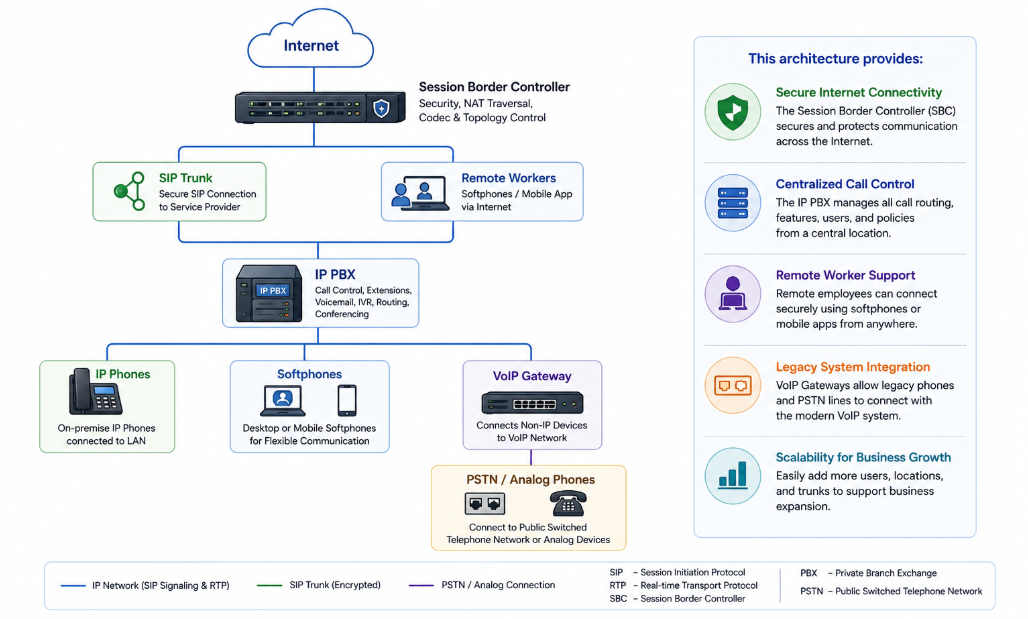
This architecture provides:
- Secure Internet connectivity
- Centralized call control
- Remote worker support
- Legacy system integration
- Scalability for business growth
### Choosing the Right Components
The components required depend on your organization's communication needs.
| **Requirement** | **Recommended Component** |
| --- | --- |
| Office desk phones | IP Phones |
| Internal call management | IP PBX |
| External telephone calls | SIP Trunk |
| Legacy analog phones | FXS Gateway |
| Existing PSTN lines | FXO Gateway |
| ISDN migration | Digital Gateway |
Understanding these requirements helps organizations build a cost-effective and scalable VoIP solution.
---
## Best Practices
When designing a VoIP environment, consider the following recommendations:
**1. Choose Business-Grade IP Phones**
- Enterprise devices typically provide better audio quality, longer support lifecycles, and advanced management capabilities.
**2. Select an IP PBX That Matches Business Needs**
- Consider factors such as:
- Scalability
- High availability
- Licensing model
- API integration
- Vendor support
**3. Secure SIP Trunks**
- Protect SIP trunks using:
- Session Border Controllers (SBCs)
- Firewalls
- TLS encryption
- Strong authentication
**4. Plan for Future Growth**
- Choose components that support additional users, branch offices, and future technologies without requiring major redesigns.
---
## Key Takeaways
- An IP phone captures and plays digital voice.
- The IP PBX acts as the central controller for call processing and telephony features.
- SIP trunks connect VoIP systems to external telephone networks without physical phone lines.
- VoIP gateways bridge IP-based communication with legacy analog or digital telephony systems.
- Understanding how these components interact is fundamental to designing, deploying, and troubleshooting enterprise VoIP environments.
---
## Frequently Asked Questions
**1. Do I always need an IP PBX?**
- Not necessarily. Cloud-hosted VoIP services often provide PBX functionality in the cloud, eliminating the need for an on-premises IP PBX.
**2. Can I use analog phones with VoIP?**
- Yes. Analog phones can be connected using an FXS gateway or an Analog Telephone Adapter (ATA).
**3. Is a SIP Trunk the same as a VoIP provider?**
- Not exactly. A VoIP provider offers communication services, while a SIP trunk is the connection used to access those services.
**4. When do I need a VoIP Gateway?**
- Gateways are typically required when integrating VoIP with legacy analog phones, fax machines, or digital PSTN/ISDN systems.
**5. Can an organization use both SIP Trunks and Gateways?**
- Yes. Many businesses use SIP trunks for modern communications while retaining gateways to support legacy equipment during a phased migration.
---
# Continue Learning
You now understand the key building blocks of a VoIP system and how they work together to deliver voice communication over IP networks.
[**Next Article:** ***Understanding SIP Registration and Authentication***](https://bual.asia/blog/understanding-sip-registration-and-authentication)
In the next article, you'll learn:
- How SIP devices register with a SIP server
- The SIP REGISTER process step by step
- Digest authentication explained
- Registration expiry and re-registration
- Common registration issues and troubleshooting
Article 3: VoIP Components Explained: IP Phones, IP PBX, SIP Trunks, and Gateways
Learn how IP phones, IP PBXs, SIP trunks, and VoIP gateways work together to power reliable business communications. Explore their roles, key differences, enterprise architecture, and best practices for building a scalable VoIP system.